New words light up, everywhere you read.
Sluka is a reader for the open web. It highlights the words you haven't learned yet on any page, in a book, under a video or in a chat window, and remembers what you know from one site to the next. Your words stay on your own devices.
One payment. No subscription, no account, no server to depend on.
Free for your first 1,000 words in each language. The extension works in Chrome, Brave and Edge. All downloads
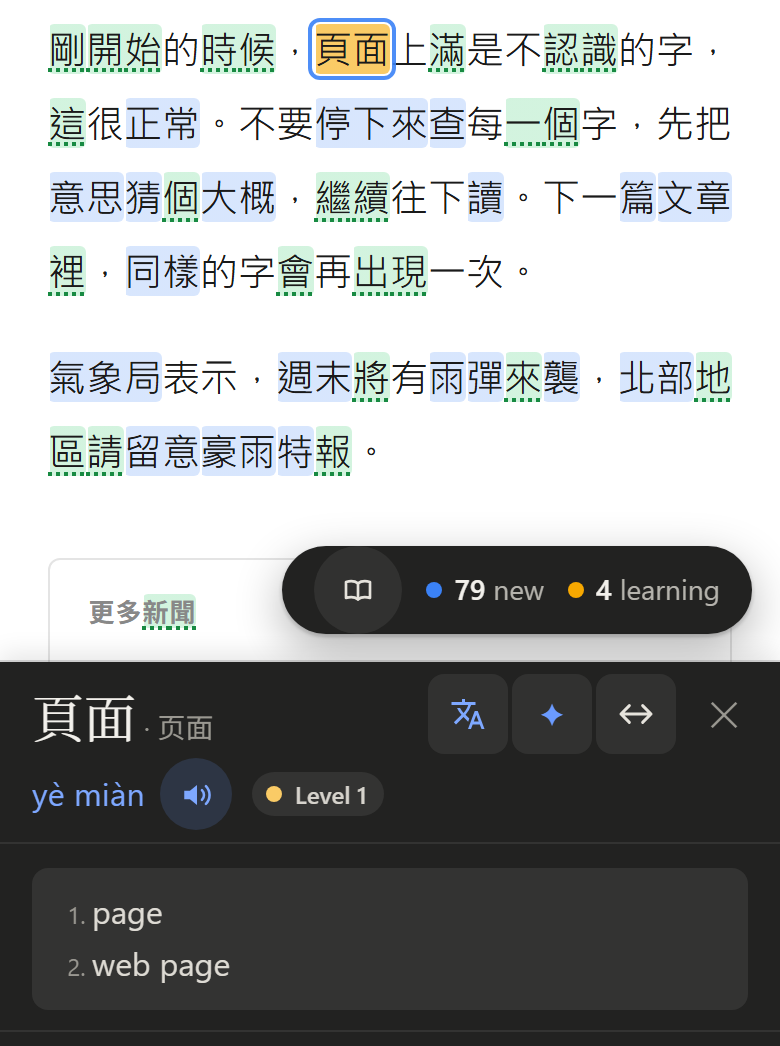
New Learning 1 2 3 4 Known — no highlight at all
This demo starts you off knowing the 700 most common words, with 200 more in progress; your grades stay in this browser. The article is fetched through sluka.app for the demo only — the extension reads pages in your own browser. Only a word the dictionary lacks or a phrase you select goes to Google Translate, and that switches off in Settings.
The video plays in YouTube’s own player, and its subtitles were saved from YouTube for this demo. Here Sluka’s subtitles sit under the picture, because nothing may be drawn over an embedded player; on youtube.com they sit on it, in place of YouTube’s own. If YouTube shows its captions too, its CC button turns them off. Your grades stay in this browser.
The sample books are in the public domain: the first chapters of Collodi’s Pinocchio, with Carlo Chiostri’s drawings, and three stories by Lu Xun, both from Wikisource. A PDF or EPUB of your own is read in this browser and never uploaded. Scanned PDFs have no text to read.
Where it works
Anywhere the words are.
The open web
Articles, forums, fiction, documentation. Any page in the language you are studying, including pages set vertically (直排).
Video
Captions on YouTube, Netflix and other players are highlighted, with an autopause that waits for you before the line disappears.
Chatbots
Conversations with an assistant in your target language are read as they stream in, which makes a chatbot a source of endless graded input.
Books
PDF, EPUB and plain text, with the same highlighting and the same word list. On a computer, scanned PDFs, pictures and .cbz comics are read too, by OCR that runs on your own machine (every language but Vietnamese).

Your phone
An Android app with the same reader and shelf. Your words sync with your computer over your own network — not through anyone's server.
Twenty-four languages
One at a time, so the shelf and the statistics always belong to the language you are actually in.
- Bundled dictionary
- Chinese
- Cantonese
- Japanese
- Korean
- Italian
- English
- French
- German
- Dutch
- Spanish
- Portuguese
- Swedish
- Danish
- Norwegian
- Finnish
- Polish
- Russian
- Ukrainian
- Greek
- Turkish
- Vietnamese
- Indonesian
- Thai
- Arabic
Chinese counts as one language in both scripts. Cantonese is its own language, with jyutping. Korean is cut into words inside each phrase. Arabic reads the spoken dialects too, right to left.
Listening counts too
Your hours on YouTube and Spotify, counted without being asked.
Reading is half the input. Sluka also counts time spent listening to the language you are learning — and only that language. Time is credited against the track's own clock rather than the wall clock, so a paused tab, a stalled player or a sleeping laptop earns nothing, and a podcast at 1.5× credits the time you actually spent.

Desktop
YouTube and the Spotify web player, in any tab, with nothing to press. Spotify's desktop app is invisible to extensions, and always will be.
Android
Anything playing on the phone, the Spotify and YouTube apps included. Sluka reads what the player itself reports, from any app.
iPhone and iPad
Not out yet. In the app, Spotify and YouTube will count inside Sluka's own browser, where both are built in. iOS lets no app see another app's playback.
The method
Massive input, in the tradition of Steve Kaufmann.
Sluka is not a neutral tool. It is built around one way of learning a language, and it is bad at every other way on purpose.
“Listening and reading are so powerful.” Steve Kaufmann — polyglot in some twenty languages, who began Russian at sixty
Kaufmann's argument is that a language is absorbed rather than studied. You take in a very large amount of real content you actually find interesting, you meet the same words again and again in contexts that differ slightly each time, and your brain extracts the patterns without being told the rules. Grammar arrives as a feeling for what sounds right, long before it arrives as a table. He names three things that decide whether it works: attitude, time spent with the language, and the ability to notice what the language is doing.
-
1
Real content, not learner content
The web is the library. Read the articles, forums and fiction you would have read anyway — Sluka works on whatever is in front of you rather than on a walled catalogue of graded texts.
-
2
Volume beats drilling
No flashcards, no spaced repetition, no review queue that grows while you sleep. A word is learned by meeting it in twenty sentences, not by being tested on it in isolation.
-
3
Ambiguity is allowed
You do not have to understand every word to make progress, and Sluka never blocks the page until you do. Words you skip stay lit and come back around.
-
4
Listening counts as much as reading
Time under video captions and time in an audio player are tracked alongside words read, because half of the input is the half you hear.
-
5
Progress is a word count
The number that matters is how many words you know and how much you have got through. There is a daily streak for anyone it helps, and no badges, no confetti and nothing that goes red after a quiet week.
Sluka runs on the whole open web instead of inside a content library, your words and statistics stay on your machine, and you pay once. Coming from LingQ or Language Reactor? Sluka imports your words.
Read the method in fullHow it works
Grade a word in one keystroke, then get on with reading.
There is no review session and no test. You read something you wanted to read anyway, and the words sort themselves out as you go.
Open any page
Sluka reads the HTML, so highlights stay glued to the words when you scroll, resize or zoom. No OCR, no screenshots, no copy and paste. Shift+L opens the article on its own in Sluka's reader, light or dark, and puts it on your shelf.
Hover, then press a key
Hovering shows the reading and the meaning. 1–4 sets how well you know it, K marks it known, X ignores names and numbers.
It follows you
A word learned in an article is already known in the next book, video and forum thread. Your vocabulary is one list, not one per site.
Counted honestly
Words read are credited only for text on screen long enough to be read. Scrolling to the bottom in two seconds credits two seconds. Share the numbers on the public scoreboard if you like; it is off until you join.
Yours, on your machine
Words, books and statistics live in your own browser. No account. Back it up to a file whenever you like. Google Translate sees only words the dictionary lacks, phrases you select and untranslated subtitles, and each switches off in Settings.
Price
Fifteen dollars. Once.
There is no subscription and there never will be. Renting a reading tool forever is the thing this was built to get away from.
Free to try
The first 1,000 words in each language are free.
Nothing is time-limited and no feature is switched off. The free version stops letting you save new words in a language once you are tracking a thousand of them there — everything already saved keeps working, and so does every book and every page. A second language starts fresh. You build a real vocabulary first and decide afterwards whether the tool earned fifteen dollars.
Add to ChromeThe extension is in the Chrome Web Store, for Chrome, Brave and Edge. The Android app is on the download page; it is not on Google Play or the App Store yet. If you would like to know when it lands, write to help@sluka.app.
Every feature, every language, every device you own.
- The browser extension and the phone app
- All twenty-four languages and every bundled dictionary
- Books, video captions, chat, sync and statistics
- A licence that verifies offline, forever, with nothing to phone home to
-
No account. No renewal. No server that has to still exist next year.
Paid through Polar, who handle the card and the tax. Your licence appears on screen the moment the payment clears, and arrives by email as well.
Refunds
If it doesn't work, you get your money back.
The policy, in full
If Sluka has a technical fault and you can show it to me at help@sluka.app, you get a full refund. That is the whole condition.
Showing it to me means enough to see the fault: the page or book you were reading, what you expected, what happened instead. A screenshot or a short screen recording is usually plenty. Include your licence key.
I would much rather fix the problem than take the refund, so expect a fix to try as well. The refund does not wait on it. Refunds are issued through Polar to the card you paid with.
Lost your key? Have it emailed again — it is derived from your purchase, so it can always be reissued.
Feedback
Feedback is always welcome.
Sluka is still young, and the people using it notice things I don't. If something breaks, feels awkward, or is missing for the way you learn, I would really like to hear about it. Every message is read and taken seriously.
There is a Sluka channel on Chytran's Group, a Discord server of language learners. You can post there, see what others have brought up, and talk it through.
Prefer email? help@sluka.app works just as well.

Bug reports, ideas, questions, or just how your learning is going. All of it is welcome.
Join the server